Key takeaways
- Microphone quality: built-in stereo microphones are standard; directional patterns help.
- Recording format: MP3 saves space; WAV or other lossless formats keep more detail.
- Storage: internal memory plus microSD slot extends capacity.
- Battery: USB-rechargeable or AAA-powered; consider how long the semester day is.
- Controls: easy start and stop buttons so you do not miss the beginning.
- Transfer: USB connection or app support to move files to a laptop.
The Sony ICD-UX570 suits most students who want a pocketable recorder with clear audio, long battery life and simple controls, the Zoom H1essential suits those who want higher-quality 32-bit float stereo recording and protection against clipping, and Olympus or OM System WS-series recorders suit anyone who values simplicity and long battery life. If you want automatic transcripts instead of raw audio, an AI-enabled recorder or a transcription app is a different route. This guide uses the makers’ stated specifications and reviewer summaries; several roundups are sales-driven, so treat rankings with some caution.
Our top picks



As an Amazon Associate we earn from qualifying purchases at no extra cost to you.
What a lecture recorder needs
Lecture halls are tough for recording: you sit far from the speaker, the room echoes and others cough. Features that help include a good stereo microphone, adjustable sensitivity or a lecture scene mode, enough storage for hours of audio, and a battery that lasts a full day. Check the institution’s recording policy and ask the lecturer’s permission before recording; some places forbid it or require consent.
- Microphone quality: built-in stereo microphones are standard; directional patterns help.
- Recording format: MP3 saves space; WAV or other lossless formats keep more detail.
- Storage: internal memory plus microSD slot extends capacity.
- Battery: USB-rechargeable or AAA-powered; consider how long the semester day is.
- Controls: easy start and stop buttons so you do not miss the beginning.
- Transfer: USB connection or app support to move files to a laptop.
At a glance
| Recorder | Type | Best for | Reported points | Limits |
|---|---|---|---|---|
| Sony ICD-UX570 | Compact stereo recorder | General lecture use | Roundups cite about 22 hours of recording, 4 GB internal memory, microSD slot, USB charging | Smaller memory than some; plastic build |
| Sony ICD-PX370 / PX470 | Budget mono or stereo recorders | Simple, low-cost recording | Reviewers cite long battery life and simplicity | Fewer features; audio quality below upper models |
| Zoom H1essential | Stereo field recorder | High-quality audio, noisy rooms | 32-bit float recording and X/Y microphones per the maker; no Bluetooth reported | Less pocketable; more features than needed for some |
| Olympus / OM System WS-882 | Compact voice recorder | Noise reduction and simplicity | Ranked second in one outlet for noise cancellation | Older design in some listings |
| Olympus WS-853 | Compact voice recorder | Long battery life | Listed with a very long battery rating and microSD support | May be previous generation in some regions |
| Plaud Note Pro or similar AI recorder | AI transcription device | Automatic transcripts and summaries | Cited for transcript features | Subscription or cloud processing considerations |
Sony ICD-UX570: the common top pick
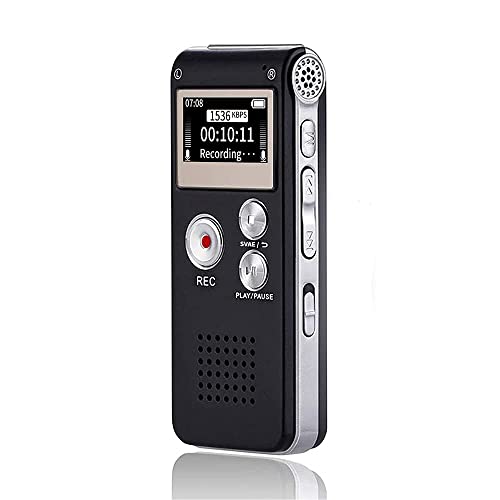
Many roundups name the ICD-UX570 the best choice for lectures. Its appeal is a slim body, a built-in USB connector for charging and file transfer, a microSD slot for extra storage and an intuitive layout. Sony lists several recording scenes and directional settings, which help when you sit at the back of a hall. Reviewers still advise sitting as close to the speaker as possible, because no built-in microphone can fully overcome distance.
Zoom H1essential: audio quality first
The H1essential records in 32-bit float according to the maker, which preserves detail and makes clipping from sudden loud sounds much less of a concern. Reviewers highlight it as a pro audio option with good value. It is bigger than the Sony and has no Bluetooth, so you transfer files by cable or card. It suits seminar and music students and anyone who records interviews as well as lectures.
Olympus and OM System: simplicity and battery life
WS-series recorders are cited for noise reduction, easy button layouts and long battery life. OM System, the successor brand to Olympus voice recorders, is recommended by some outlets for noisy rooms. Availability varies, and some listings show previous-generation models, so confirm that the model you want is still sold by the maker.
Budget: Sony PX series
The ICD-PX370 and PX470 are often mentioned as inexpensive recorders that are simple to use and offer long battery life. They suit students who just need clear speech in small classrooms and are not worried about stereo imaging.
AI recorders and transcription apps
If your main goal is text, an AI recorder such as the Plaud Note Pro, or a phone app such as Notta, can transcribe and summarize audio. Reviewers point out trade-offs: subscriptions for heavy use, reliance on cloud processing, and the need to check accuracy. Consider privacy and your institution’s rules before uploading lecture recordings to an online service.
Budget tiers without prices
- Budget: Sony ICD-PX370 or PX470.
- Mid-range: Sony ICD-UX570, Olympus or OM System WS-series, Zoom H1essential.
- Premium: AI recorders with transcription services and larger field recorders.
Fit, setup and care notes
- Placement: put the recorder on the desk pointing toward the speaker; avoid rustling paper near the microphones.
- Wind and handling noise: use a small stand or foam cover when available.
- Test before class: record a minute and listen back so you catch settings problems.
- Backups: copy files to a computer after each class.
- Battery: charge overnight and carry a spare cable.
- Consent: follow school policy and local law about recording people.
Pick X if…
| If you… | Pick | Why |
|---|---|---|
| Want a simple all-round lecture recorder | Sony ICD-UX570 | Compact, USB charging, microSD slot |
| Sit far from the speaker or record loud events | Zoom H1essential | 32-bit float helps prevent clipping |
| Want long battery life and simplicity | Olympus or OM System WS-series | Easy controls, battery-focused |
| Need the lowest entry tier | Sony ICD-PX370 or PX470 | Basic recording at low cost |
| Want automatic transcripts | AI recorder or app | Transcription and summaries |
| Record interviews too | Zoom H1essential | Better stereo capture |
Alternatives worth a look
- Phone recording app with a clip-on microphone: uses gear you already own; battery drain and notification interruptions are the risks.
- Lavalier or boundary microphone with a recorder: better pickup in large rooms where permitted.
- Livescribe-style smartpens: link handwriting to audio, useful for review, though pens and paper are required.
Getting better recordings and avoiding mistakes
The most frequent complaint about lecture recordings is distance. A recorder on the back row of a large hall picks up the room more than the speaker, and no model can fully fix that. Sit near the front when you can, place the recorder on a stable surface and avoid sitting beside noisy ventilation or doors. Cover the microphones with a foam windscreen if the recorder supports one.
The second complaint is forgetting to check settings. Before the first class, set the recording format and quality, confirm that the date and time are correct so files are easy to find, and run a short test. Many students discover after the fact that they recorded in a low-quality mode or with an overly low sensitivity setting.
The third is file management. Name files by course and date, copy them to a laptop and a backup service after class, and delete old recordings from the device so there is always space. If you use a transcription service, read the privacy policy, because audio may be stored on remote servers, and follow your school’s rules.
A short buying checklist
- Decide whether you need audio only or audio plus transcripts.
- Check the stated battery life against your longest day.
- Look for a microSD slot or enough internal memory.
- Confirm how files transfer to your computer.
- Choose stereo microphones if you sit in large rooms.
- Read the institution’s recording policy and ask permission.
Using recordings to study
A recording is most useful when you pair it with notes. Mark the time of key points in your notebook so you can jump back to them, and listen at a slightly faster playback speed if the software allows it. Many students review recordings within a day while the material is fresh. Keep files organized in course folders, and delete recordings you no longer need once the exam is over or when your institution’s rules require it.
Frequently Asked Questions
Is a dedicated recorder better than a phone for lectures?
Dedicated recorders usually have better microphones and longer battery life, and they do not interrupt notes with calls. Phones are convenient and may be good enough for small rooms. A recorder is worth it for large halls.
How much storage do I need for a semester?
MP3 files are small, so a few gigabytes holds dozens of hours. Lossless formats use much more space. Copy files to a computer regularly and delete them from the device.
Can I record lectures legally?
Rules vary by school and by country or state. Ask the instructor and read the institution’s policy before recording, and do not share recordings without permission.
What does 32-bit float mean?
It is a recording format that preserves a very wide range of loudness, so loud sounds are far less likely to distort. The maker of the Zoom H1essential lists it as a feature.
Do I need AI transcription?
Not necessarily. It saves time but may add subscription costs and privacy considerations, and the text should be checked for errors. A plain recorder plus a separate transcription app is another route.
How can I get clearer audio from the back of a hall?
Sit closer if you can, use the directional or lecture mode, and place the recorder on a stable surface. Better microphone placement beats any setting.
More from Amazon
Programs that pair well with the guide above. Offers and eligibility are set by Amazon and may change.
Set up recurring deliveries of everyday items on eligible products. Terms and savings are set by Amazon.
Explore Subscribe & SaveCollect the home and kitchen items you want in one registry that guests can shop from.
Create a wedding registryFree shipping on eligible items, Prime Video and more. Eligible new members can start with a free trial.
Start a Prime free trialAudiobooks and podcasts to listen to on the go. Eligible new members can start with a free trial.
Try Audible freeAs an Amazon Associate we earn from qualifying purchases.